Bulk Pass Creation & Updates (Batch Operations) for Apple & Google Wallet
Read Time:
Lando Norris is a Fan
F1’s Lando Norris likes to batch prepare his go-to breakfast (overnight oats, if you’re asking) because it saves him time. We get it: at PassEntry we’re fans of finding ways to help our clients save time, and when it comes to issuing passes for digital wallets, working with batches is an easy win. If it’s good enough for the Formula 1 World Champion, it’s good enough for us.
Introducing Batch Pass Creation and Batch Updates from PassEntry, which together make it simple to issue and edit digital wallet passes in bulk.
No dev work. No integrations. No hassle.
Bulk Pass Creation & Batch Updates
Upload a single spreadsheet (CSV) and PassEntry automatically creates hundreds, or indeed thousands, of Apple Wallet and Google Wallet passes for you. Meet Batch Pass Creation.
No longer do you need to edit passes individually; upload a spreadsheet (CSV) and PassEntry applies updates across your entire inventory in seconds. Say hello to Batch Updates.
Ideal for membership renewals, seasonal campaign and event schedule updates and invaluable when you need to quickly make changes to a loyalty reward scheme or apply barcode or NFC updates.
Built for scale
Real solutions designed to meet real operational challenges. Using Batch Pass Creation and Batch Updates event organisers can now instantly update times, reassign seats, or replace cancelled tickets for thousands of attendees. Travel operators can update schedules and boarding times across entire passenger lists. Hospitality businesses can refresh membership tiers, expiry dates, and apply seasonal offers to their entire database. Retailers can push new discount codes and promote targeted offers to selected customer groups. Agencies can automate their client campaigns, apply changes across multiple locations and easily refresh passes at the end of the year.
Batch updates are a total game-changer when managing high pass-volumes and an essential tool for anyone running large-scale memberships. Think events, ferry and airline companies, retail campaigns, and loyalty programmes all these companies using digital wallet passes will benefit. You can apply edits to literally thousands of passes instantly - fixing errors, refreshing offers, updating expiry dates and barcodes whilst confident in the knowledge that you are minimising the risk of human error.
Achieve fast, scalable, high-volume creation (and updates) to both Apple and Google Wallets passes with a minimum of effort and without any coding or technical knowledge.
Follow these six steps:
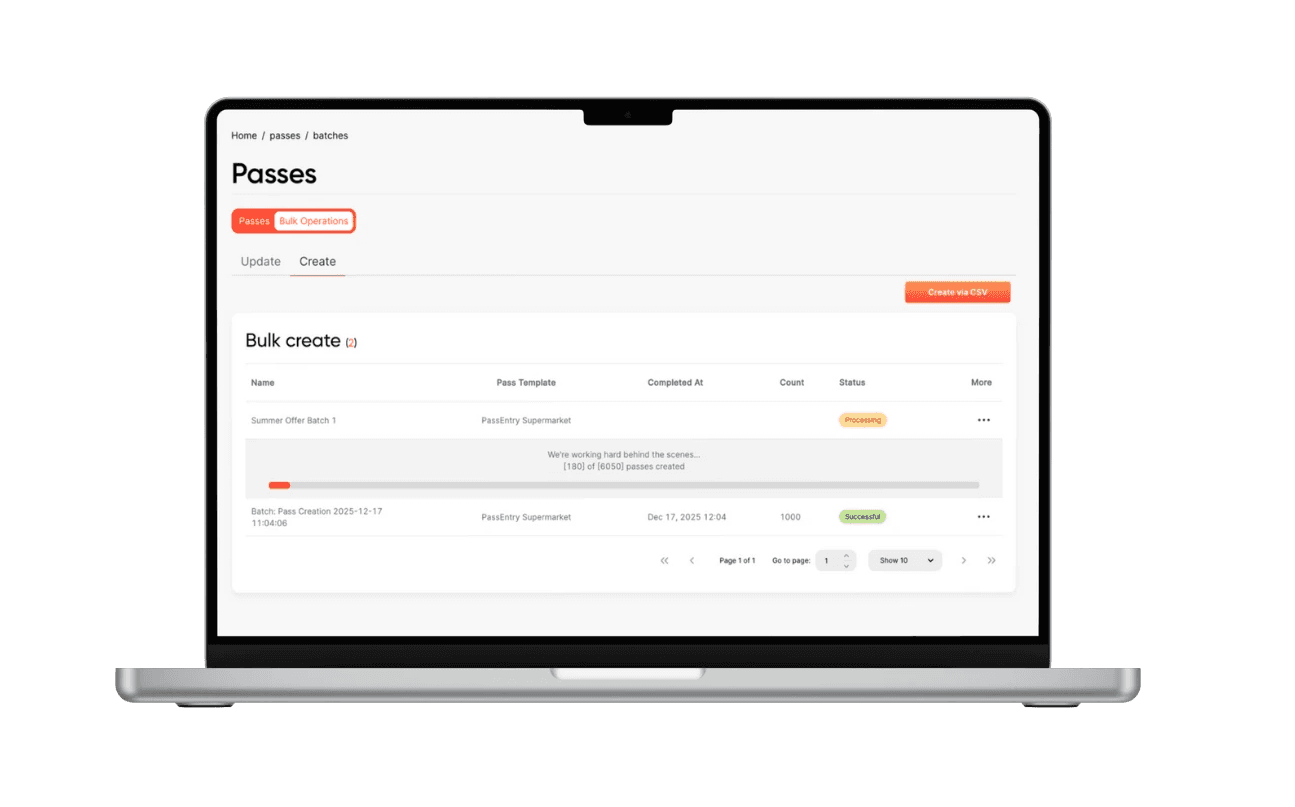
Go to Passes – ‘Create Passes via CSV’
Create a New Batch name the batch and select a template
Download the Sample CSV enter your customer data
Upload your CSV PassEntry now automatically creates/updates passes using your data
Track Progress Monitor passes as they are processed. Download error reports/fix and re-upload
Download Results CSV providing invaluable data for CRM syncing
Easy. If you can use Excel or Google Sheets, you can batch create - and batch update - your digital passes.
Batch Pass Creation and Batch Updates - just two of the reasons why so many clients trust PassEntry to provide the end-to-end solutions for their Apple and Google Wallets passes.